
Frame rates can make or break a gaming experience, especially in an open-world title as massive, chaotic, and visually stunning as Grand Theft Auto 6. Since the official reveal trailer dropped, gamers have been hyper-analyzing the staggering amount of detail crammed into Vice City. Let’s not sugarcoat it: rendering the state of Leonida is going to demand a serious toll on gaming hardware. Getting to that sweet spot of 60 frames per second (FPS) might not be easy, but it is achievable.
This comprehensive GTA 6 FPS Guide will break down exactly what performance you can expect based on your current (or future) gaming PC, how to optimize your settings, and the technologies that will push your frame rates to the next level. If you’ve been searching for a “gta 6 fps calculator” to predict your performance, consider this the ultimate deep dive into understanding exactly what those numbers mean and how to improve them.
Let’s dive right into the performance expectations and optimization secrets that will ensure Vice City runs buttery smooth when launch day finally arrives.
The Reality of the RAGE 9 Engine
Before we talk about specific frame rates, we need to talk about the engine powering them. Rockstar’s Advanced Game Engine (RAGE) has undergone a profound evolution. Reports suggest the version powering GTA 6, unofficially dubbed RAGE 9, features entirely revamped systems for physical water simulation, real-time lighting, advanced vehicle damage physics, and most importantly, an unparalleled level of NPC density and AI behavior.
All of these features eat into your CPU and GPU overhead. Unlike linear shooters, open-world games like GTA 6 place an immense burden on the processor to track hundreds of independent entities in real-time. This means your frame rate won’t just depend on your graphics card; your CPU is going to be tested equally hard to avoid massive bottlenecks. Stuttering in open-world games is frequently a result of CPU limitation rather than raw GPU power, especially when driving at high speeds through densely populated city centers. We should expect RAGE 9 to be heavily multi-threaded, meaning modern CPUs with higher core and thread counts will have a distinct advantage.
Target Framerates and hardware Expectation Tiers
We have modeled the expected performance scaling based on the history of RAGE engine games, modern AAA rendering techniques, and current hardware capabilities. Note that while absolute exact benchmarks won’t be available until closer to the PC release, our proprietary hardware modeling gives us a very solid picture of what you will need. (You can also get personalized estimates using our GTA 6 GPU Calculator).
Here is a breakdown of what to expect across different tiers of PC hardware in 2026.
The Entry Level / Budget Tier (1080p, 30-45 FPS Target)
For those rocking hardware that is starting to show its age, GTA 6 is going to be a formidable challenge. We are talking about machines equipped with GPUs like the NVIDIA RTX 3050, GTX 1660 Ti, or the AMD Radeon RX 6600, paired with older CPUs like an Intel Core i5-10400F or Ryzen 5 3600.
- Expected Performance: If you want to play at 1080p, you are likely going to be spending a lot of time hovering in the 30 to 45 FPS range. To stay closer to a consistent 45 FPS, you will need to rely heavily on low-to-medium settings.
- The Bottleneck: At this tier, VRAM is going to be your biggest enemy. If you have an 8GB or 6GB card, you will likely need to push texture quality down to avoid massive stuttering when entering new areas or driving fast.
The Mid-Range Tier (1080p/1440p, 60 FPS Target)
This is where the vast majority of PC gamers currently sit. If your rig features an NVIDIA RTX 4060, RTX 3070, or an AMD Radeon RX 6700 XT/7600, alongside a capable modern mid-range CPU like the Ryzen 5 7600X or Intel Core i5-13400F, you are in a good spot for the classic 60 FPS experience.
- Expected Performance: At 1080p on High settings, hitting 60 FPS should be easily achievable, perhaps with minor dips during exceptionally explosive or chaotic sequences. At 1440p, you’ll need to drop some settings down to Medium, or rely on upscaling (which we’ll discuss below), to maintain that fluid 60 FPS mark.
- The Sweet Spot: This tier requires the most fine-tuning. Finding the perfect balance between visual fidelity and frame rate is critical here because your hardware is right on the bubble of greatness. If you are specifically looking to build a mid-range machine, make sure to check out our Best PC Build for GTA 6 guide.
The High-End Tier (1440p, 60-90 FPS Target)
Now we’re entering premium territory. Gamers armed with an NVIDIA RTX 4070 Ti, RTX 4080, or AMD Radeon RX 7900 XT paired with top-tier processors like the Ryzen 7 7800X3D or Intel Core i7-14700K are going to have a significantly smoother ride.
- Expected Performance: You can comfortably target 1440p resolution on High to Ultra settings and cruise past 60 FPS, likely hovering between 70 to 90 FPS depending on your upscaling choices. If you want to dip your toes into 4K gaming, these cards will do it, but you might be forced back closer to the 60 FPS line.
- Ray Tracing Capability: This tier is where hardware-accelerated Ray Tracing actually becomes viable without crippling your framerate entirely, though you’ll definitely need DLSS or FSR to keep it smooth.
The Enthusiast “No Compromises” Tier (4K, 60+ FPS or 1440p 120+ FPS)
For the lucky few with an RTX 4090, the upcoming RTX 5090, or the RX 7900 XTX, budget is not a concern, and neither are frame drops.
- Expected Performance: 4K resolution, Ultra settings, full path tracing (if supported), and a rock-solid 60+ FPS. Alternatively, if you prefer high refresh rates over raw resolution, these monsters will push 1440p well past 120 FPS, ensuring that shooting and driving feel insanely responsive.
- Future Proofing: If you are building this tier now, you are effectively guaranteed to have one of the best possible experiences with GTA 6 on day one. Use our GTA 6 PC Builder to map out your ultimate enthusiast build.
The Ultimate Graphics Settings Optimization
If you aren’t rocking an RTX 4090, reaching that 60 FPS holy grail is going to require some sacrifices. The good news is that not all graphics settings are created equal. Some tank your frame rate without making a noticeable difference to the visuals, while others drastically improve the look of the game with barely any performance penalty.
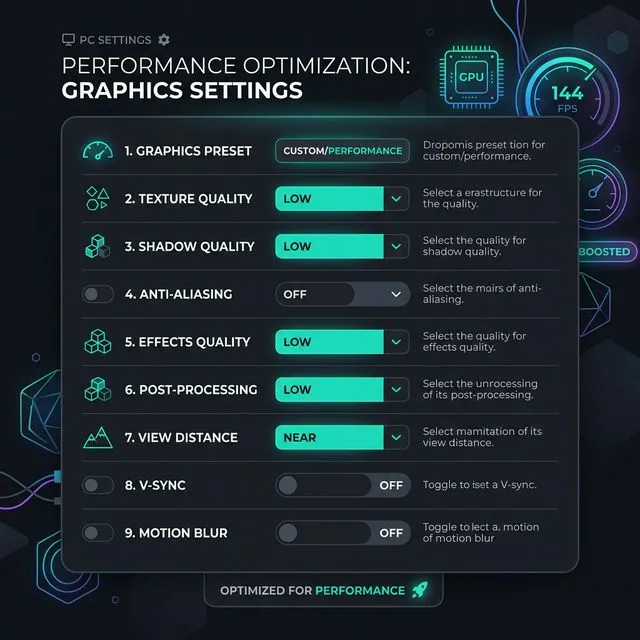
When the game launches, adjusting these specific levers will be the key to optimizing your gta 6 fps calculator results in the real world.
The Heavy Hitters (Turn These Down First for More FPS)
If you are struggling to hit 60 FPS, these are the settings you need to target immediately. Lowering these can yield massive performance gains:
- Volumetric Quality (Clouds & Fog): Rendering realistic, dynamically lit clouds and fog is incredibly taxing. In Red Dead Redemption 2, volumetric quality was notorious for halving framerates. Knocking this down from Ultra to High or Medium usually frees up 10-15% of your GPU overhead with very little visual loss during general gameplay.
- Water Quality & Physics: The Vice City setting means water will be everywhere. RAGE 9’s water physics are expected to be state-of-the-art. If you aren’t actively in a boat or swimming, reducing water quality can provide a stable framerate boost, particularly during coastal driving scenes.
- Shadow Resolution & Advanced Shadows: Soft shadows and high-resolution distant shadows eat up VRAM and processing power. Dropping shadow quality down a notch is one of the oldest, most reliable ways to claw back 5 to 10 FPS instantly.
- NPC & Vehicle Density: This is your CPU lifesaver. If your GPU is fine but the game stutters or drops frames when you enter busy intersections, your CPU is failing to keep up. Lowering the population density reduces the number of AI entities the processor has to track.
The Free Visuals (Keep These High)
These settings generally have a minimal impact on your FPS but make the game look significantly better:
- Texture Quality: As long as you have enough VRAM (Graphics Memory), setting textures to High or Ultra shouldn’t cost you any frames. If you have an 8GB+ GPU, leave this cranked up for those crisp road details and character models.
- Anisotropic Filtering (AF): This sharpens textures viewed at oblique angles (like looking down a long stretch of highway). Even 16x AF has an almost imperceptible performance cost on modern GPUs. Keep it maxed out.
- Tessellation: Used to add 3D depth to flat surfaces (like brick walls or muddy roads), tessellation is handled very efficiently by any graphics card made in the last five years.
Will GTA 6 Support DLSS 3 and FSR 3?
The short answer is: absolutely. Given the industry trends and the sheer graphical weight of GTA 6, it is almost unfathomable that Rockstar would launch the PC version without comprehensive upscaling support.
These technologies will be the absolute silver bullet for hitting 60+ FPS on mid-range hardware. Here is how they work and why they matter:
NVIDIA DLSS (Deep Learning Super Sampling)
If you have an NVIDIA RTX card, DLSS will be your best friend. It renders the game at a lower internal resolution (e.g., 1080p) and uses AI to intelligently upconvert the image to your monitor’s native resolution (e.g., 1440p). The result? An image that looks nearly indistinguishable from native 1440p, but with the performance of 1080p.
More importantly, if GTA 6 supports DLSS 3 Frame Generation (exclusive to RTX 4000 series cards and newer), the AI will actually generate entirely new frames and insert them between the traditionally rendered ones. This can literally double your frame rate. It feels like black magic, and it is the exact tool you will need if you want to run maxed-out settings on an RTX 4060 or 4070. For more on how this AI upscaling revolution is changing the industry, check out NVIDIA’s official DLSS deep dive.
AMD FSR (FidelityFX Super Resolution)
AMD’s alternative, FSR, serves the same fundamental purpose but does not rely on dedicated AI hardware, meaning it works on practically any graphics card, including older NVIDIA GTX series cards and all AMD Radeons.
FSR 3 also brings its own version of frame generation. If you are struggling with an older card like a GTX 1660 Super, running FSR on the “Quality” or “Balanced” preset might be the sole reason you are able to push past the 40 FPS mark and get reasonably close to a 60 FPS experience. Furthermore, open-source adoption by AMD makes it highly likely Rockstar will implement it natively to ensure broad compatibility. You can explore the mechanics of AMD’s open standard on the AMD FidelityFX page.
Console vs. PC FPS Comparison: What to Expect
Let’s address the elephant in the room: the console release. When GTA 6 launches on the PlayStation 5 and Xbox Series X/S in 2025 (a year before the anticipated PC launch), what frame rates will console players experience?
Current industry consensus heavily suggests that the PS5 and Series X will be capped at 30 FPS. The CPU limitations of the current console generation are simply too tight to manage the massive, highly complex, AI-driven open world of Leonida at a stable 60 FPS while maintaining Rockstar’s benchmark-setting visual fidelity. A 60 FPS “Performance Mode” is possible, but it would require brutal sacrifices to resolution, crowd density, and lighting quality—sacrifices Rockstar is historically hesitant to make for their flagship titles.
This is precisely why the PC version is so highly anticipated. PC gaming is where the chains come off. The PC version is where you will get to experience GTA 6 precisely how it was meant to be experienced: at blistering frame rates, ultrawide resolutions, and mouse-and-keyboard precision.
Non-Game Optimizations: Tweaking Your OS for Every Last Frame
Sometimes getting over that 60 FPS line requires looking outside the game menu. Here are three quick Windows optimizations you must make before booting up GTA 6:
- Hardware-Accelerated GPU Scheduling: Open your Windows Graphics Settings and turn this on. It allows your GPU to manage its own memory independently of the CPU, which reduces latency and can provide a measurable FPS bump in CPU-heavy games like GTA 6.
- Game Mode: Ensure Windows Game Mode is enabled. This prevents background tasks (like Windows Update or antivirus scans) from stealing CPU cycles while you are playing.
- Clean Up Background Apps: Discord, Chrome, Spotify—these apps eat up RAM and CPU threads. If your hardware is screaming for help to hit 60 FPS, shut down absolutely everything except the game and the Rockstar Launcher.
Next Steps and Monitoring Your Performance
You cannot manage what you do not measure. Once you have tweaked your settings, you need to monitor your performance to ensure your changes are working. We highly recommend using software like MSI Afterburner with RivaTuner Statistics Server (RTSS) to get a lightweight, on-screen display of your frame rate, 1% lows, GPU usage, and CPU temperatures. Pay close attention to your 1% lows—this metric represents the most severe frame drops. If your average frame rate is 65 FPS, but your 1% lows are 25 FPS, the game will still feel incredibly stuttery and you need to dial back your CPU-intensive settings.
If you are wondering whether your specific combination of CPU and GPU has what it takes, we strongly advise using our Can I Run GTA 6? Checker. It takes the guesswork out of the equation and provides a comprehensive diagnostic.
Getting 60+ FPS in GTA 6 is going to be the gold standard of PC gaming in 2026. Keep this guide bookmarked, use our GTA 6 System Requirements page to track the official numbers as they drop, and whether you are relying on raw hardware power or the magic of DLSS, rest assured that Vice City is going to look spectacular no matter how you play it.