
VRAM is the single most misunderstood spec in PC gaming right now. Everyone is asking about frame rates and DLSS, but the real gatekeeper for GTA 6 performance is going to be your graphics card’s video memory. If you do not have enough of it, no amount of settings tweaking will save you from stutters, pop-in, and blurry textures.
We have spent months analyzing the RAGE 9 engine, studying how Red Dead Redemption 2 pushed VRAM limits, and tracking hardware trends across 2025 and 2026. This guide gives you the honest, no-fluff answer to the biggest question in PC gaming: how much VRAM do you actually need to run GTA 6 properly?
Let us get straight into it.
What is VRAM and Why Does It Matter So Much for GTA 6?
Before we talk numbers, you need to understand what VRAM actually does during gameplay. Think of it as your GPU’s personal workspace. Every texture, shadow map, lighting buffer, and asset that appears on your screen has to sit inside this workspace before it can be rendered.
In an open-world game like GTA 6, the workload is brutal. Unlike a corridor shooter where the game only loads one room at a time, Vice City demands that your GPU hold thousands of assets simultaneously. You are driving at 120 mph down a highway while the engine streams in building textures, road details, vegetation, pedestrian models, vehicle reflections, and dynamic weather effects. All of it has to fit inside your VRAM.
When the VRAM fills up, the GPU starts pulling data from your system RAM instead. System RAM is significantly slower. The result is micro-stuttering, texture pop-in (where a building suddenly snaps from blurry to sharp right in front of you), and frame time spikes that make the game feel “hitchy” even if your average FPS looks fine on paper.
Here is the critical takeaway: average FPS lies. A card that shows “55 FPS average” might feel terrible if it has constant micro-stutters caused by VRAM overflow. A card with “45 FPS average” but enough VRAM will feel dramatically smoother. This is why VRAM matters more than raw performance for GTA 6.
What We Know About GTA 6 VRAM Demands
Rockstar has not released official PC system requirements yet. But we are not guessing blindly. Three data points give us a very clear picture.
1. Red Dead Redemption 2 Set the Baseline
RDR2 runs on the RAGE engine and remains one of the most VRAM-hungry games ever made. At 1440p with Ultra settings, it regularly consumes 10-12GB of VRAM. At 4K, testers have recorded usage spikes up to 14-15GB. And that game launched in 2018. GTA 6 will be significantly more demanding because the RAGE 9 engine introduces virtualized geometry streaming, hardware-accelerated ray tracing, and next-generation texture systems.
2. The PS5 Tells Us the Minimum
The PlayStation 5 has approximately 12.5GB of usable memory shared between the CPU and GPU. Rockstar is building GTA 6 with the PS5 as the baseline console. This means the game is being designed around roughly 10-11GB of GPU-accessible memory on consoles. The PC version will likely use even more because of higher resolution textures and additional graphical features.
3. The 2025-2026 AAA Trend Is Clear
Recent AAA titles are already pushing past 8GB VRAM at 1080p. Games like Alan Wake 2, Star Wars Outlaws, and Indiana Jones and the Great Circle all exceed 8GB with high textures enabled. GTA 6 will land at the tail end of this trend, and based on engine complexity, it will almost certainly push beyond what these games demand.
Taking all three data points together, we can build a very accurate VRAM requirement profile for GTA 6.
The VRAM Tier List: Where Does Your GPU Fall?
Let us break this down by the four VRAM categories that matter. Find your graphics card and see where you land.
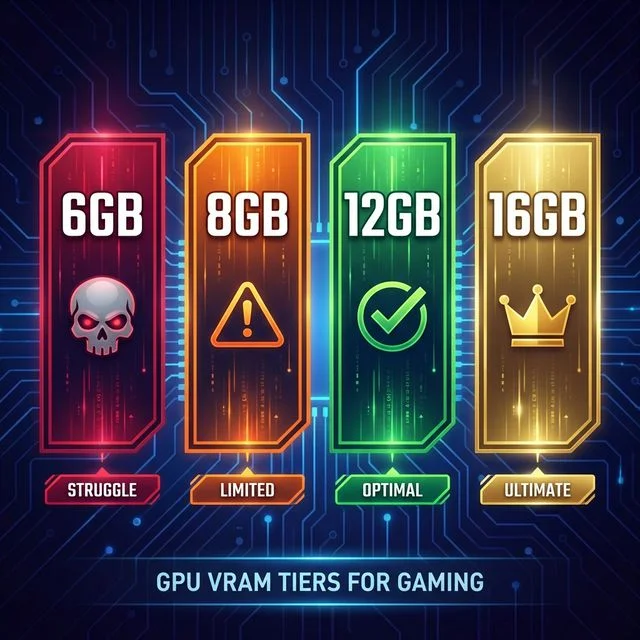
Tier 1: 6GB VRAM (Critical Danger)
Cards in this tier: RTX 3060 Laptop (6GB), RTX 2060, GTX 1660 Super, RX 5600 XT
Verdict: Below minimum. You will struggle to run GTA 6 at any setting.
Six gigabytes of VRAM is already a problem in 2025 for current AAA titles. For GTA 6, this amount simply will not be enough to hold the game’s base textures at 1080p. You will be forced into the lowest texture quality, and even then, the engine’s dynamic asset streaming will likely cause constant stuttering as your GPU swaps data in and out of its tiny memory pool.
If you are in this tier, we strongly recommend upgrading before GTA 6 launches. Look at our Best PC Build for GTA 6 guide for budget-friendly options.
Tier 2: 8GB VRAM (The Danger Zone)
Cards in this tier: RTX 4060, RTX 4060 Ti (8GB), RTX 3060 Ti, RTX 3070, RX 7600, RX 6700 XT
Verdict: Playable at 1080p, but you will feel the limits.
This is where the biggest debate lives. Eight gigabytes gets you through the door, but just barely. Here is what to expect:
- 1080p Medium settings: You should hit a stable 50-60 FPS with DLSS enabled. VRAM usage will hover around 7-7.5GB, giving you minimal headroom.
- 1080p High/Ultra textures: VRAM will exceed the 8GB limit. You will see textures downgrade automatically, and driving through dense urban areas will produce noticeable stuttering.
- 1440p: Not recommended. VRAM usage jumps significantly at higher resolutions, and 8GB cards will be constantly hitting the ceiling.
- Ray Tracing: Forget about it. Enabling hardware ray tracing on an 8GB card adds 2-3GB of VRAM overhead, which would put you well over the limit.
The RTX 4060 sits in an interesting position here. It has Frame Generation (DLSS 3) which can boost perceived smoothness, but Frame Gen does not reduce VRAM usage. If the memory is full, Frame Gen cannot fix the stuttering. This is why the RTX 4060 controversy exists: it is fast enough in raw performance, but the 8GB memory limit will hold it back in texture-heavy open-world games like GTA 6.
If you own an 8GB card and plan to play GTA 6 at 1080p Medium, you will be fine. But if you expect to crank up the textures or play at 1440p, the experience will be compromised.
Tier 3: 12GB VRAM (The Sweet Spot)
Cards in this tier: RTX 3060 12GB (Desktop), RTX 4070, RTX 4070 Super, RTX 5070, RX 7800 XT, RX 7900 GRE
Verdict: Comfortable for 1080p and 1440p. This is the target.
Twelve gigabytes is where things start feeling right. You get enough room for high-quality textures without constant swapping, and the VRAM buffer can handle the dynamic asset streaming that the RAGE 9 engine demands.
- 1080p High/Ultra: Smooth experience with headroom to spare. VRAM usage around 9-10GB, leaving a healthy buffer for spikes.
- 1440p High: Very playable. This is the resolution where 12GB truly shines, keeping textures sharp while maintaining a solid buffer.
- 1440p Ultra + Ray Tracing: Tight, but possible. Expect VRAM usage to push close to 11-12GB. You may need to drop one or two settings to avoid occasional hitching.
- 4K: Workable at Medium settings, but 12GB starts to feel tight at this resolution.
Here is the thing that makes the 12GB tier special. The RTX 3060 12GB desktop card has been around since 2021, and it has more VRAM than the newer, faster RTX 4060 (which only has 8GB). This means that while the 4060 will produce higher raw frame rates, the 3060 12GB might actually deliver a smoother moment-to-moment experience in VRAM-heavy scenes. Fewer stutters, less pop-in, more consistent frame pacing.
If you are shopping for a GPU right now with GTA 6 in mind, 12GB should be your minimum target. The RTX 4070 Super and RX 7800 XT are excellent picks. Check our GTA 6 GPU Calculator to see exactly how your card stacks up.
Tier 4: 16GB+ VRAM (Future-Proof)
Cards in this tier: RTX 4080, RTX 4090, RTX 5080, RTX 5090, RX 7900 XT, RX 7900 XTX, RX 9070 XT
Verdict: No VRAM worries. Max everything.
With 16GB or more, VRAM is no longer a bottleneck. You can run GTA 6 at any resolution, with any texture quality, with ray tracing cranked up, and the memory buffer will handle everything the engine throws at it.
- 1440p Ultra + Full Ray Tracing: No issues. VRAM usage peaks around 12-14GB, well within the buffer.
- 4K Ultra: The full GTA 6 experience. This is where 16GB becomes essential.
- 4K Ultra + Ray Tracing: Only 16GB+ cards can attempt this without VRAM-related stuttering.
If you own an RTX 4080, 4090, or any of the new RTX 50-series, you are set. The GPU performance will be the limiting factor, not the memory.
What Happens When You Run Out of VRAM?
We touched on this earlier, but it is worth diving deeper because a lot of people confuse “low FPS” with “not enough VRAM.” They are two completely different problems.
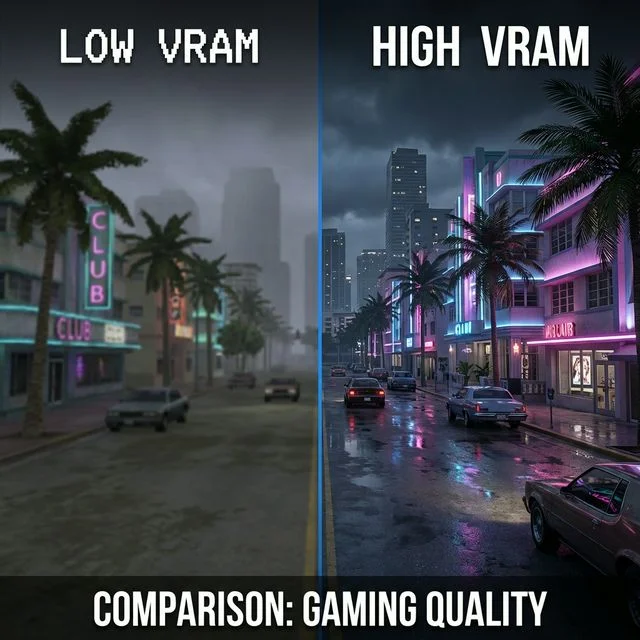
When your GPU runs out of VRAM, the game does not just slow down uniformly. Instead, you get frame time spikes. Your FPS might read “55 average” but every few seconds, the game freezes for 50-100 milliseconds while new textures are loaded from system RAM. This creates a pattern that feels like the game is “hitching” or “jerking.”
The visual symptoms are equally annoying:
- Texture pop-in: You drive past a building and watch its surface snap from a blurry blob to a detailed texture right before your eyes. In a single-player story game where immersion matters, this ruins the experience.
- Asset streaming delays: Vegetation, signs, and smaller objects appear out of thin air as you approach them instead of being pre-loaded.
- Shadow and lighting glitches: When the VRAM pool is full, the engine may drop shadow maps entirely, causing flickering shadows or pitch-black areas.
The worst part is that no settings adjustment can fully fix a VRAM deficit. You can lower resolution, turn off ray tracing, and reduce draw distance, but if the base texture quality still exceeds your VRAM, the stuttering remains. The only real solutions are either reducing textures to Low (which makes the game look awful) or upgrading your GPU.
The GPU Buying Guide: VRAM per Budget
If you are planning to buy a new graphics card specifically for GTA 6, here is our recommendation breakdown by budget:
| Budget | Recommended GPU | VRAM | GTA 6 Target |
|---|---|---|---|
| Under $250 | RX 7600 XT | 16GB | 1080p High |
| $250 – $350 | RTX 4060 Ti 16GB / RX 7800 XT | 16GB | 1440p High |
| $350 – $500 | RTX 5070 / RTX 4070 Super | 12GB | 1440p Ultra |
| $500 – $700 | RTX 5070 Ti | 16GB | 1440p Ultra + RT |
| $700+ | RTX 5080 / RTX 4080 | 16GB | 4K Ultra |
Notice the pattern. We are recommending cards based on VRAM capacity first and raw performance second. That is how important memory is going to be for this specific game.
One more thing. Do not fall for the “I will just use DLSS to reduce VRAM usage” myth. DLSS reduces rendering resolution, which slightly lowers the GPU’s framebuffer usage. But the main VRAM consumers in GTA 6 will be textures, asset buffers, and shadow maps, and DLSS does not shrink those at all. Your texture pack still needs to fit in VRAM regardless of what upscaling technology you enable.
How to Check Your Current VRAM Usage?
If you want to see exactly how much VRAM your GPU is using right now, here are two methods:
Method 1: Task Manager (Windows)
- Open Task Manager (Ctrl + Shift + Esc)
- Go to the “Performance” tab
- Click on “GPU” in the left sidebar
- Look for “Dedicated GPU Memory Usage”
Method 2: MSI Afterburner (In-Game Overlay)
- Download MSI Afterburner (free)
- Enable the on-screen display
- Add “GPU Memory Usage” to the metrics
- Launch any game and monitor VRAM usage in real time
Try running GTA V or Red Dead Redemption 2 at your preferred settings and check the VRAM usage. If it already exceeds 7GB, you are going to have problems in GTA 6 with an 8GB card.
Frequently Asked Questions
Is 8GB VRAM enough for GTA 6?
At 1080p with Medium textures and DLSS enabled, 8GB is playable. But you will not have any headroom for higher settings, and dense urban areas will likely cause micro-stuttering. For a comfortable experience, 12GB is the recommended minimum.
Is 12GB VRAM enough for GTA 6?
Yes. 12GB VRAM is the sweet spot for GTA 6 at both 1080p and 1440p. You can run High to Ultra textures with room to spare. It is the most balanced option for gamers who want quality without spending a fortune.
How much VRAM does GTA 6 need for 4K?
For 4K gaming with High or Ultra textures, we recommend a minimum of 16GB VRAM. Cards like the RTX 4080, RTX 5080, and RX 7900 XTX are ideal for this resolution.
Will the RTX 3060 12GB run GTA 6 better than the RTX 4060 8GB?
In terms of raw FPS, the RTX 4060 wins. But in terms of smoothness and texture quality, the RTX 3060 12GB may actually feel better because of its larger VRAM pool. The 3060 can hold more textures in memory, reducing stuttering in dense areas. We cover this in detail in our RTX 3060 GTA 6 Guide.
Does DLSS reduce VRAM usage?
DLSS reduces the rendering resolution, which slightly lowers framebuffer memory. However, it does not reduce the size of loaded textures, shadow maps, or asset buffers. VRAM-heavy games will still fill up your memory even with DLSS enabled.
Can I add more VRAM to my GPU?
No. VRAM is physically soldered onto the graphics card and cannot be upgraded. The only way to get more VRAM is to buy a new GPU.
Final Verdict
Here is the bottom line. If you take one thing away from this article, let it be this: for GTA 6, your VRAM matters more than your FPS.
A fast card with too little memory will stutter. A slower card with enough memory will feel smooth. The RAGE 9 engine is designed for next-generation consoles with 10-12GB of usable GPU memory, and the PC version will demand even more for higher-quality textures and ray tracing.
Our recommended minimum for a good GTA 6 experience is 12GB VRAM. If you are buying a new GPU today, do not go below this number. The 8GB cards will survive at 1080p Medium, but they will age poorly as post-launch updates and GTA Online content push VRAM usage even higher.
The cards we recommend most for GTA 6 are the RTX 4070 Super (12GB) for 1440p and the RX 7800 XT (16GB) for long-term value. Both offer the VRAM headroom and raw performance to deliver a smooth Vice City experience. Test your current setup instantly using our free GTA 6 GPU Calculator.
Your move.